

I've changed the Fire TV Voice Remote control batteries 5 times already but it still keeps disconnecting and now it's gone completely dead!
Trust me, by the end of this article, we'll have your Fire TV Remote connected and fully working again!
2026 update: I've checked this guide to make sure it still makes sense for current Fire TV devices. In 2026 the quickest fixes are still the same: use brand new batteries, re-pair the remote, use the Amazon Fire TV mobile app if you're locked out, and inspect the battery contacts for corrosion or residue.
Fire TV Remote Solution 1:
I know you don't want to hear it, but trust me.
Update: The most probable cause for your Fire TV remote not working is going to be the batteries. I know, you're already thinking "I've already changed the batteries twice... gimme a break..."
Well my friend, the Fire TV remote is a fickle beast and only likes new fully charged batteries before it will re-connect to your Fire TV Stick or Box. I've tried switching in batteries from other remotes that are all working fine, but with no success. Unopened new batteries are often the key to this power-hungry remote.
Related: Has your Amazon Fire TV Box or Fire TV Stick become slow? See My Fire TV Slowdown Solution.
This need for new batteries is especially true when your Fire TV is next to a complicated TV setup... think AV, Speakers, WiFi Router all piled up next to each other. Signal interference is definitely an issue with some Fire TV remotes.
If you've already tried a shiny new set of batteries and it's still not working then you might have the same issue I had with the remote. Luckily, a quick and completely free fix.
Don't forget to check out help & tips in the comments at the end: You can also leave any questions you have, plus there's tons of useful FireTV hacks.
Okay, so let's get to Solution 2 of 'My Fire TV Remote Won't Connect!'.
If you've felt the annoyance of your Fire TV Voice Remote suddenly not connecting then I know how you feel. I've used Fire TV devices for years and, up until this happened, the remote had been completely reliable. Then out of nowhere it kept disconnecting and eventually died completely, showing no signs of life.
Related: You can also control many Fire TV devices with an Amazon Echo Dot.
I went through an array of different fixes to try and get this remote working again but then finally I had a brainwave and managed to bring the remote back to life.
It wasn't through trawling internet blogs and YouTube videos that I found this solution, it was actually from inspecting the remote carefully. No, it wasn't Amazon's fault for building inferior products, it was actually my own fault and partly the fault of cheap pound store batteries that litter the UK.
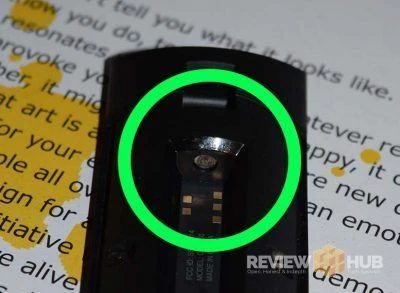
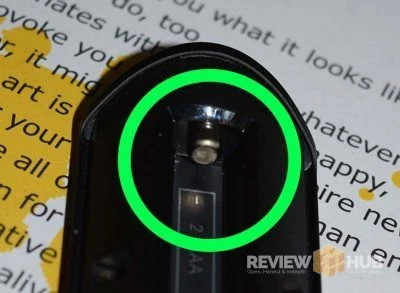
When I took the battery cover off the Fire TV remote it looked completely normal. It wasn't until I raised the remote up to eye level that I noticed that there was a slight chalky residue on the connectors of the battery compartment. It then dawned on me as I looked across the room at a packet of cheap pound shop batteries. One of the cheap batteries had leaked battery acid onto the Fire TV remote connectors blocking the current from getting through.
I'll show you how to fix this below in Solution 2. First, some quick tips to help you out.
How to use your Fire TV when the remote won't turn on?
Luckily, Amazon has an app for that called Amazon Fire TV. It's available on Google Play and the Apple App Store. Make sure your phone is on the same Wi-Fi network as the Fire TV device, then use the app to control your Fire TV and work through the next steps below.
How to check if your Fire TV remote is connected to your Fire TV?
To see if your Fire TV remote is connecting to your Fire TV stick, box or TV, head to the settings menu.
- Settings > Controllers and Bluetooth Devices.
- Amazon Fire TV Remotes
This should show you which remotes are currently paired. In my case, when fiddling with the batteries, my remote would appear here for a few minutes and then disappear.
If all else fails, you can get an official Amazon Fire TV Remote replacement. But first, let's try and fix that remote!
Fire TV Remote Broken: Solution 2
I took a flat head screwdriver and gently scraped the connectors of the Remote at each end. Wiping the residue off with a dry cloth as I scraped. The connector should look shiny and new again at the end of this process. I placed the batteries back in and the remote connected again straight away.
If you want to be a bit more professional, you can follow some of the suggestions in the comments and use a Qtip with some isopropyl.
Great news, I've had no problems with the remote since and I guess the moral of the story is sometimes you get what you pay for... utter crap leaky batteries this time around.
Repairing Fire TV Quick Tips
- First try the modern pairing method: hold the Home button for about 10 seconds to put the remote into pairing mode.
- If the remote still won't connect, restart the Fire TV from Settings > My Fire TV > Restart or unplug the power for around 60 seconds, then try pairing again.
- On some older Fire TV remotes, model-specific button combinations still apply, so if Home pairing fails check Amazon's reset steps for your exact remote version.
Fire TV Remote Not Syncing Bonus Tips
Some users have reported that interference from a nearby router or crowded Wi-Fi environment has been the issue. This is more of a secondary fix than a first step, but it's still worth checking if batteries, pairing and a restart haven't helped.
Login to your router (details on the unit). Find WiFi Channel and switch to another channel. You can use 'WiFi Analyzer' from Google Play to see the least used channel for your home.
Let me know if this last tip worked in helping to reconnect your Fire TV Remote?
I hope this helps you out and gets your Fire TV all connected again. If you've had problems or know any fixes then please leave a comment and I can update the guide.
Comment submitted successfully! It will appear once approved.
Submission failed. Please verify the Captcha and try again.
The restart and unplug worked perfectly ! Thank you so much. I thought I had a bad remote.
Works for me.
Thanks
How do you get to settings if your remote won't work?
Hey Lou,
If you have a smartphone you can use the Amazon Fire TV Remote App.
https://play.google.com/store/apps/details?id=com.amazon.storm.lightning.client.aosp&hl=en
Hello I try tried all the suggestions and nothing worked for me. I had this problem before and I cleaned out the battery component and the problem was fixed but now it's like it's dead completely. The App isn't available in my country as I am in the Caribbean. Please help
My husband and I just got the new fire stick and my dad was installing it using his tv. Well mid way through my remote stops working and my dad put his in and his remote wasn't working..... now what do we do??!!
Hi,
If you have a smartphone to hands you can download the FireTV app and control the fireTV stick that way. You can then go to settings and re-connect the remote.
I reset my firestick back to factory and now my firestick remote won't pair can anyone help me please
Hi Nikki,
I would put a fresh pair of batteries in to the remote then hold the home button for 10 seconds. Wait a little and see if it connects.
If this doesn't work then the next step would be to download the FireTV App for your smartphone.
If your FireTV isn't connected to the internet you will need to plug it in into you router manually with a cable.
Once connected to the internet you will be able to control your FireTV Stick with the phone App.
Use the app to go to settings / remotes and then sync your remote to the device.
Hope this helps : )
James @ Review Hub
My friend gave me his Fire TV and remote as it was not working and "you're the expert at this sort of stuff", me an expert? I'm on a state pension. Anyhow cut to the chase, after messing about for thirty minutes I came across your solution and changed the batteries! Two lessons learned, Do the basic stuff first, and never believe someone who says they've "tried new batteries". Ta.
Glad you got it working!
Yeah the FireTV remote only loves brand new batteries. I can't count the amount of times I've tried switching in batteries from other remotes that are working have had no response.
James, you are a Genius! I'm a degreed Physicist and Engineer, but even I had failed to note the virtually invisible oxidation on the surface of the negative battery terminal. A quick polish and "Voila", battery presence and Remote function restored! Thank you SO much!
Glad you got it working : )
Thanks mate I'm not good when it comes to technical issues , I never knew about the tv app and now I have reconnected the remote to the stick, the app works brilliant from my tablet and now I have two options to control the stick. Thank you from one very great full technology dunce.
I dnt have a remote anymore I have been using the app but yesterday when I turned the fire stick on it said could not find remote hit the home button for 10 seconds but since I dnt have the remote it wnt do anything for the app do to the stick needs to be on aand connected to the internet befre the app will connect what can I do
Hi Jason,
Sounds like you're in a bit stuck. If the FireStick isn't connected to the internet and you don't have the remote then you won't be able to use the FireTV Remote App.
Is there a reason that the FireTV Stick isn't connecting to you're WiFi?
A friend purchased a new fir stick and is having the same issue with connecting the remote to the fire stick. So much so, Amazon sent a 2nd remote and that did not work. Amazon then sen tout another fire stick and we still cannot get the remote to connect in order to do the initial set-up. Any suggestions?
This is my problem - remote faulty right out of the box. I'm using the iOS app but this is a big detriment to enjoying the Stick.
Fantastic worked straight away. The problem was cheep batteries from Ikea. Thanks for saving us £20 on New remote.
It's not battery "acid". It's the opposite, battery alkali. Best to use vinegar on a swab. The acidic vinegar disolves the white alkali from your defective battery.
If it can't find your FireTV Remote and you've held the home button for 5 seconds then it's time to feed the beast some new batteries : )
Hey Patrick,
Sound like you've tried everything. Is it out of warranty? If it's within a year, I'd just get the remote replaced. Even if it's out of warranty I'd still try my luck on something like Amazon's live chat.
Good luck and hope you get it sorted!
Hey,
Yes, you'll just need to pair it with your Fire TV Device : )
Hey Charlie,
Thanks, Glad you got it working without having to resort to a new controller!
Mine stopped & it's not the batteries (came with Amazon brand batteries,) but I've found that if I take out the batteries for a bit then put em back in, it will work for another few clicks. Sometimes have to keep them out a minute or so...but at least I can still watch. Oh & I take the batteries out when not in use, this helps. Tried to buy a new one but they're unavailable for two months.
I bet it's those batteries! The FireTV Remote is a fickle beast! Try some brand new quality Duracell batteries : )
If that doesn't work... get yourself the FireTV Android or iOS app to use for now. If you contact Amazon directly (Phone / Live Chat) as long as you're within the year (from purchase date), I'll bet they have some replacements on hand to send out.
Don’t download the phone App, doesn’t tell you at the time but it only works with a Sony Bravia tv , conned out of £4,99 , poor stuff going back to Netflix....
Hey Grant,
The 'Amazon Fire TV Remote App' for Android & iOS are both FREE. If you follow the links in this article it'll take you to the official download pages. Or just look for the apps that made by 'Amazon Mobile LLC'.
Looks like you've downloaded a 3rd party app by mistake. Get the official App, it's free and it works! : )
Awesome! Glad it worked for you! : )
Haha, not sure I can recommend this approach. Don't want any law suits on my hands! :D
Try at your own risk! : ) Thanks for the tip Mike!
Thanks for the tip. I tried everything else and was about to order a new remote. Five seconds with a tissue and it's back in working order!
HI James, thank you... my remote just won't work but thank you for your suggestion about the app on the phone. I'm back in business with that... while I figure out what's up with the remote... Thank you so much!
It seems like the app on the phone still requires use of remote. I can’t figure out how to navigate without the fire remote, to set up connection with app
I tried all these steps to no success. Then I noticed the battery connector had calcified. A qtip and lemon juice solved the problem immediately.
(The original Amazon branded batteries were still in the remote which I also replaced.)
Thanks for the tip! Worked like a charm!
Hey Lien,
Good to know, thanks for the tip! : )
Thank you!!! It was corrosion that stymied me for two trouble shooting sessions and three battery changes. I read your post, noticed a bit of corrosion, scraped it off with a screw driver. I had used the phone app in the meanwhile, but I am glad to have the remote working once again.
I wish i could hug you lol. Worked like a charm!!!!
I have tried everything ans still can't get this remote to work! Looks like I am going to have to buy a new one! UGH!!! Thanks for th tip. No more cheap batteries.
Awesome, glad this helped you out! :)
Thank You...I could reconnect the firestick with your amazing tips...
Awesome, glad it helped! : )
If you're TV is connected to your WiFi have you tried the Fire TV App? Link above.
You shouldn't lose any data by unplugging, but I'm no Fire TV Jailbreaker don't take my word for it : )
I'm looking forward to the rest of the novel. :D
ooops.... here it is! : )
I'd try resetting it. Unplug it from the TV > disconnect the power cable (If applicable) > re-insert. (Use power cable if you previously didn't) Some TV's don't have enough ampage through the HDMI slot.
Then check to see if there are any software updates.
If this happens again. Then you might have a faulty unit. So best to contact Amazon and get it replaced.
Hi I need help, my daughter dropped my fire stick remote on soda i dried it good and it was working the whole night it seems like it didn’t had no more soda residue at that moment but days later I try to use it and it wasn’t working no more. What can I do to fix it? I tried all of your suggestions but it didn’t work, anybody has more tips on maybe how I can get t fix
HELP PLEASE, i have 3 fire sticks in 3 different tvs, none working, its the remotes that arnt connecting, cant use at all xxx
The best thing that worked was putting new batteries in and then unplugging the fire stick from the wall and plugging it back it. Then waiting for the home screen to come up and holding the home button down for 20 seconds. After that the new remote was paired perfectly.
In the voice of chandler bing :
OH MY GOD!!
Cynical skeptic here but now I’m a believer. My firestik is only six months old and I didn’t think anything would have to be cleaned or changed -well...wrong! Once I committed I cleaned every single surface that I possibly could either with a brush or Cinch or both. And that was down to the power plug. Guess what!?!
It works now.
Thank you, Master Gil
I wanted to mention that I"m using a Bluetooth keyboard meant for an iPad with my 2nd Gen Firestick. It's officially not supported but working great as a remote for kodi 17 & 18
Holy moly, I scraped the connectors clean and now my remote works! Thank you for writing this article, I would never thought of that myself!
Boom! Glad it worked for you Claire!
This is a great article and it's saved me previously. Two months ago my remote died and nothing worked to give it life.
Finally had to borrow my sister's remote to get into settings. Then add the iOS app & a bluetooth keyboard which connects automatically. Arrow keys, space bar, return/enter, (ESC is back button). Too cheap to buy a replacement remote.
Glad it helped! Thanks for the tip!
Tried all the tricks pressed it 30 seconds and wont connect Purchased a New remote and Still wont connect Nothing to do with batteries in my case. Works on the Iphone app perfectly so why won't the remote connect!!
Hallo is there any way that i can connect my app without a WiFi connection cause my remote is not working and my fire stick is not connected to my WiFi yet?!
This is also my prob;em and there doesn't seem to be an answer.
We lost our remote and bought a new one but we can't get it to work. won't connect with the fire stick. Suddenly started to connect with the TV remote but not fully. Didn't work with the TV remote previously!
Any suggestions??
Thanks guys
OK it did magically work. Nice solution; thank you so much!
: )
I have recently moved my fire stick into a different TV. Now the power button , volume button and menu buttons don't work.. the fire stick is working other wise. Just using the tv remote for the power and volume but no access to the menu button. Any ideas??
Found I had hold the remote next to the firestick, actually touch it, before it finally worked.
Dear James
Thank you for this feedback and solution. Your absolutely right and hasmd a similar problem. The issue is resolved and cleared my thinking that the remote was of inferior quality.
Regards
Caesar
I found that the batteries weren't hitting the connectors on mine, so I slightly pulled out the negative sides so that the positive end would touch the connectors more directly. This was my fix.
Alexa can hear me but doesn't respond and the remote flashes a blue light...
My Fire stick remote seems to do everything except turn the tv on. It will turn the tv off, do the volume etc but won’t turn the tv on. Is there anything I can do to get this sorted?
My remote isn’t working. I’ve changed th batteries. Tried all of the above and still no luck. It’s an older model. One of the first and thinking it might be finished with??
Hi I’ve just brought a fire stick and it ant work on my tv and the remote ant work ever could someone help me I’ve got on downstairs and it work straight away
Mannnnn thank you my remote randomly stop working and I couldn’t understand why. I changed the batteries so many times that I just gave up and was using my firetv app remote. My remote stopped working 6 months ago maybe more. I scraped off the chalky substance and now my fire tv remote is working after 6 months YOU ARE THE GOAT!!!!!
Wiping the battery connectors. So smart. Fixed my issues 100%. I even tried swapping TV's! Thank you!
i love you. thank you.
Changed the batteries to brand new ones, the connectors are clean, downloaded the app on my phone because remote still wasn’t working, restarted the tv tried disconnecting the remote and pairing again which did not work and now my app won’t connect to the tv. No idea what else to do
I cleaned the battery connections in the remote. It now works Thanks
Thanks! Your solution worked perfectly!
Brand new remote. Went and got new batteries. Can't get it to do anything. So frustrated. Should be plug and play. Not.
Must add that you're ideas was very helpful to me...especially about cleaning the battery connectors or whatsoever they're called... saw instant results ... thanks
The batteries were changed and the light will not appear in the remote, Why ?
I don't know how my remote became unpaired ..... but thankfully my tv remote took me as far as Settings > Remotes and I was able to re-pair my remote.
Thanks for the knowledge!
My fire stick remote stoped working. The first screen the tv shows is an update on new features of Alexa and firetv. There is a “get started” selection on the screen that I need to select in order to get into the firetv settings - but I cannot Do this without the remote. I tried downloading the remote app to my phone, but it isn’t detecting the tv because it’s likely not connected to the internet right now - and again, the only way I can get it connect to the internet is by getting passed the Screen it’s currently on. :( if anyone had any ideas on what I can do please let me know!! (I have changed the batteries In the remote and tried cleaning it. It’s still not working)
Thank you very much!
It was corrosion. My remote started working just fine again. During the lockdown, this is my only source of entertainment.
You're welcome! : )
Hi I can't get my fire TV (1st generation) remote to work. New batteries etc.. Can't get to settings.. anything Can you help?
Hi James. My remote has not worked in 4 months. I also have 2 other remotes that dont work but I have already purchased new ones. So I decided to google, firestick remote doesn't work. I did everything you said and now it works like new. Thank you so much. I would have save $60 if I had googled first.
Thank you very much.
Hi Lashonda!
I'm glad you got it working using our tips : )
All I did was clean the connector with a q-tip lmao I’m so mad I went to the store for batteries and messed with the remote for an hour
Glad the q-tip method worked for you! : )
My toshiba fire tv remote has a problem: The select button doesn’t work! How can I fix this?
Thank you. Waking up at 3am and having the Fire remote not work is bad enough...but I have no TV remote at all...talk about screwed.
Anyway, I tried it all, then finally tried the gentle scrape/wipe of the battery compartment. VOILA!!! It works again.
Life saver.
Glad it worked for you : )
my remotes volume, mute, and on/off button work.. but every other button doesn’t and i’m not sure if it’s just broken orrrrrr.. help please!
set up fire stick yesterday logged all info and passwords. Today tried to use it and nothing, tried holding buttons, changing batteries, only thing was the light on remote started flashing red/green fora short time, happened twice. Anyone have an idea?
Thank you James! Yesterday I went to watch a show on my Prime TV box and discovered the remote was not working. I was about to check the batteries when I saw a white substance along the crack that separates the back of the remote to the body. "Oh no!" I thought. I took the batteries out, both of them actual Amazon Basics, and tried to clean the contacts the best I could with a rag and rubbing alcohol. The remote would not work. I was able to utilize the Fire TV app on my phone to control my box, but the problem with the remote was driving me crazy. After reading your article, I took the remote back to my workbench and using a jeweler's screwdriver, began scraping the contact from the side where the battery leaked. I was surprised to see residue coming off the contact as I thought I had done a pretty good job with the alcohol. I just tested the remote again and it is once again working! What threw me for a loop was that to the bare eye the contact looked clean, but apparently the battery acid had dried in an opaque state. You just saved me $27.99 for a new remote!
Great, glad this fixed it for you! : )
I changed WiFi service. Now my fire stick won’t connect to the new WiFi cuz my phone won’t link up. Also my remote won’t sync. What can I do?
What do I do ? My remote stopped working and at about the same time I changed internet providers so the app on my phone won't work because I can't connect the firestick ...
I wrote off my remote as it hadn't worked for 5 months. And then came along this article. Thanks so much for this, the remote works like a charm now, the app really is annoying to use
My remote is still not working just power button is working can anybody help me
Hi James. So what if one day, I spoke into the remote, trying to figure something out on YouTube, and the screen completely froze, remote wasn't working, and I had to just turn the tv completely off? I turned it back on after a couple days of letting it get it's bearings, and the remote still won't get me back to the home screen. I read your article and a couple others to see if any of the methods would work. Unfortunately they did not. However, they have before, but not in this situation. I would be very grateful if you could help. Thanks. (P.S: My name is Ella for clarification).
my remote still doesn't work i changed batteries and all
Got it fixed
Remote quit, then the t.v. was reset. Now the remote still won't work and even after buying a new remote from Amazon the t.v. will not pair. Also since the t.v. was reset my app will not even show the t.v.
Thank you! My 5 year old FireTV remote stopped working a few months ago. I opened up the battery cover and found the battery terminals coated with the white chalky powder you mentioned. I just followed your suggestion and cleaned the areas inside the remote where the batteries connect using cotton swabs with isopropyl alcohol and scraping the connectors with a screwdriver until the shiny metal showed again. After putting in the batteries, my FireTV remote immediately started working again! I really appreciate your practical and cost saving suggestions!
I have been having the same power issues on my brand new FireStick remote.
Brand new batteries last a few days.
I powered it from my lab digital powersupply and at 3volts its sucking 30mA when idle
From 2 AAA batteries in series that 'should' (if my maths is right) equal something like 62 hours max of battery life, which is crazy.
So either there is a fairly common hardware fault out here -or- there is a software issue on the remote (ie someone is using a software event loop instead of using hardware interupts and hardware idle). My vote is a software issue.
My problem slightly different. Lost my remote but managed to control the firestick using the amazon app on my mobile.. Worked fine until I changed Internet providers so now the firestick can't see the phone remote as it was on a different network so can't get into the firestick to to change settings etc. Amazon say it can't be done without a physical remote but they are just about as expensive as a brand new firestick!!!! Anyone have a solution or are amazon correct in what they say?
James, I've got a jvc fire tv, I reset to factory settings yesterday and now can't connect using the app, remote and I even bought a new remote.
The new remote will power up the TV and allow me to select language but beyond that, nothing, I can't get into the TV to access any menus.
I've got a LAN network using an ethernet cable and I've tried to connect the remote with and without the cable connected.
I'm properly stuck and running out of ideas.
I've even considered buying a new TV! HELP!